CALENDARS · SKY · EVERYDAY LIFE

Celesight Calendar

Observe the heavens,
understand change.

Gregorian and Chinese dates, seasonal changes, the seven luminaries and your local sky, together in one calendar.

China edition v1.2.0 · 24.3 MiB · Android 7.0 or later

Android · mainland ChinaSimplified ChineseOn-device calendar
Celesight Calendar
14
Lunar 9/5
2026-10-14 · Wed
Month 戊戌 · Day 辛酉
Year cycle 丙午Zodiac HorseLunar year 2026
Cold DewSparrows enter the water and become clams (traditional seasonal marker)
Favorable

Marriage · Rituals · Prayers · Seeking children · Groundwork

Avoid

Consecration · Planting

Zi
Good
Chou
Poor
Yin
Good
Mao
Good
Chen
Poor
Si
Poor
Wu
Good
Wei
Good
Shen
Poor
You
Good
Xu
Poor
Hai
Poor
TodayCalendarSky notebookRemindersMore
A day at a glanceRead the rhythms of the year through a date.
TimeGregorian · Chinese · Seasons
SkyLuminaries · Star officials
DatesAnniversaries · Local reminders

01 / CALENDARS

Two calendars and their cycles,
at a glance.

Browse dates and compare lunar dates, month and day cycles, and the current solar term. The almanac, seasonal markers and twelve double-hours have their own place.

October 2026

Select a date to explore
14
Lunar 9/5

2026 / 10 / 14 · Wed

Month / day cyclesMonth 戊戌 · Day 辛酉
Year cycle / zodiac丙午 · Horse
Current solar termCold Dew
Seasonal markerSparrows enter the water and become clams (traditional seasonal marker)

This preview uses example dates from October 2026.
The App lets you explore other dates and daily details.

02 / SKY

Bring your local sky
into view.

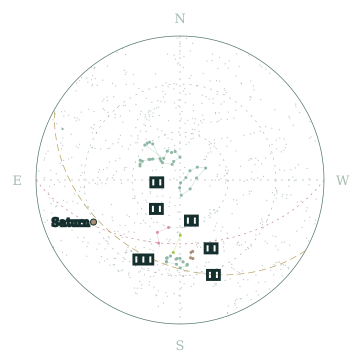
Switch between the meridian region and the whole sky to explore the seven luminaries and traditional star officials. Choose a city and adjust the time to watch the chart change.

Local meridianSeven luminaries28 mansions and star officialsMoon phase, rise and set

Sky features require sign-in and the relevant access entitlement.

Calculated local sky example for Beijing, October 14, 2026 at 20:00, with luminaries, star officials, the ecliptic and celestial equator
Beijing · Local meridian example2026.10.14 20:00

03 / REMINDERS

Remember meaningful dates
in the calendar you use.

For birthdays, anniversaries and everyday events, choose Gregorian or lunar dates and set repeats and local reminders. Keep the dates that matter within your calendar.

Local calendar, almanac and reminder features are directly available. Access to sky features is handled separately, according to your needs.

Anniversaries · Illustration

Family birthday

Lunar month 9, day 5 · Yearly
Lunar reminder

Important anniversary

October 14 · Yearly
Gregorian reminder
Reminder records stay on your device

04 / SKY NOTEBOOK

Consult historical texts.
Record the sky you see.

From historical sources to observations kept on your own device, explore the references and keep your own notes.

Historical sky texts

Look up sources by sky phenomenon.

Search by phenomena such as eclipses, comets and guest stars, or start a text comparison from selected star officials or luminaries on the chart. Expand passages and context to check original dating, work, volume and source. A word match does not identify the same astronomical event.

Observing notes

Write what you see. Keep a picture.

Add text, photos you select, or a meridian chart image. Notes stay on your device, with no upload or cloud sync. Keep your own copies of important content before clearing App data or uninstalling.

Tools for observing

Use a red light, dark-adaptation timer and telescope calculations, with a red or green interface. You can also set custom tools and historical-text URLs. External URLs open in a separate system browser window and cannot read the App's local records.

BEFORE YOU START

You may want to know

From dates to sky access.

Which features can I use directly?

Basic Gregorian and Chinese calendars, date cycles, solar terms, festivals, the almanac and anniversary reminders are directly available. Restricted sky content requires sign-in and the relevant sky entitlement.

Can I use the calendar offline?

Local calendar and almanac queries, anniversary records and local reminders do not require a continuous connection. Sign-in, entitlement refresh and App updates need a network connection. Available sky features also depend on the device's entitlement status.

Which place and time does the sky use?

Calculations use your selected observing city and time zone. Today follows the current time by default; other dates start at local noon. Expand the time controls to adjust the time and see the chart change.

Can I download and register now?

You can download the mainland China Android edition here and follow Android's installation prompts. This website has no registration or sign-in form. Check the App for the actual availability of account services.Download and version details ↗

Are anniversaries and observing notes uploaded?

Anniversaries and observing notes stay on your device. Note text, selected photos and meridian chart images are not uploaded or cloud-synced. Clearing App data or uninstalling removes local content, so keep your own copies of important information.Read the privacy policy ↗

Celesight Calendar icon

Celesight Calendar

From everyday dates to the Sun, Moon and stars.

Download and version details